
Technical details · How data moves
Dispute process
What happens when an MRF file exported from one platform cannot be imported into another, from normal troubleshooting through to dispute resolution by Invest Europe. All platforms should read and agree to this process.
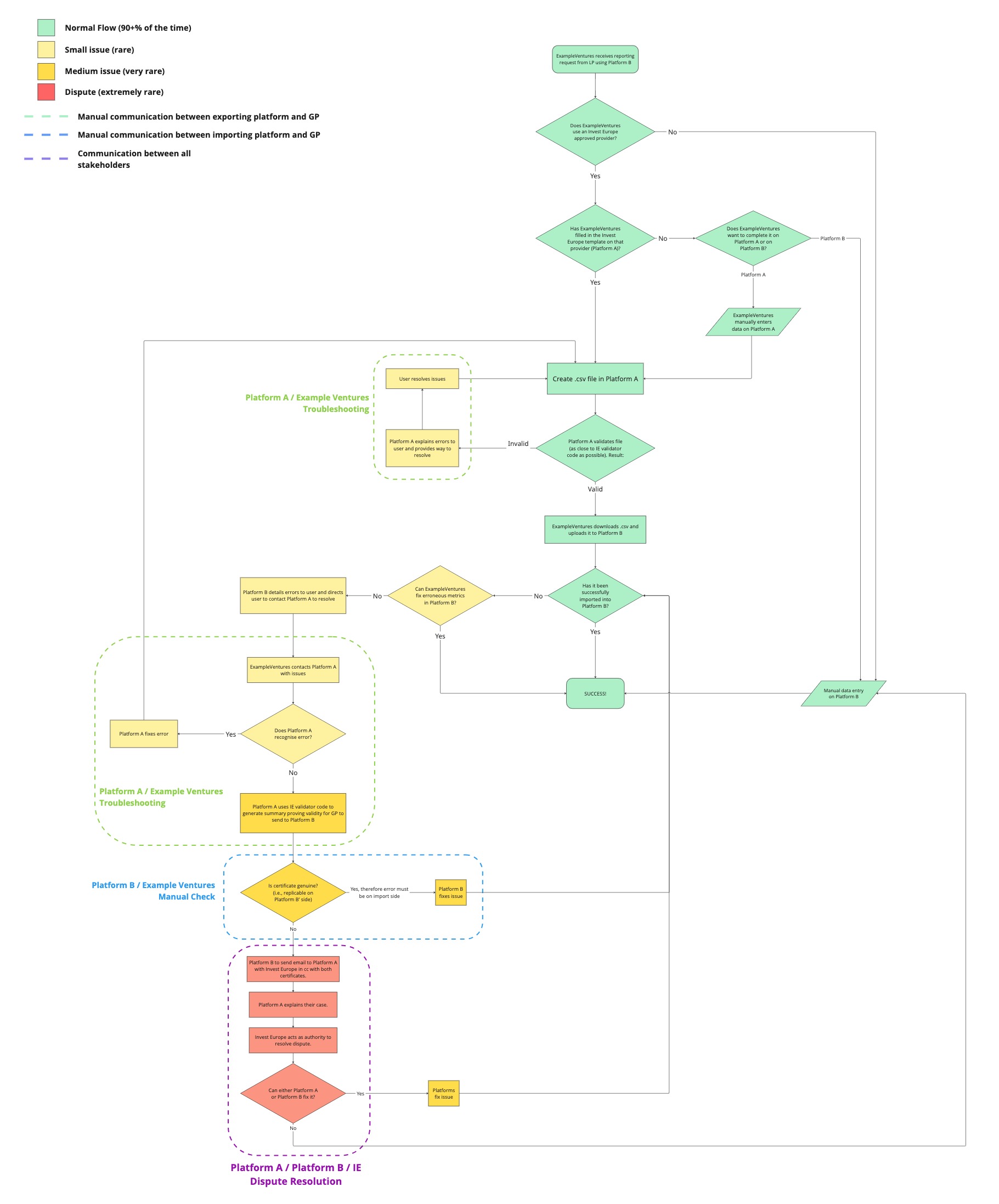
Step by step
In this example, a GP, ExampleVentures, exports its data from Platform A and needs to import it into Platform B, which its LP uses.
-
The reporting request
ExampleVentures receives a reporting request from an LP that uses Platform B.
Does ExampleVentures use an Invest Europe approved provider?
No Data is entered manually on Platform B. Success.Yes Continue below.Has ExampleVentures filled in the Invest Europe template on that provider (Platform A)?
-
Create and validate the .csv in Platform A
- Create the .csv file in Platform A.
- Platform A validates the file, using logic as close to the Invest Europe validator code as possible.
Invalid Platform A / ExampleVentures troubleshooting: Platform A explains the errors to the user and provides a way to resolve them. The user resolves the issues and creates the .csv again.Valid ExampleVentures downloads the .csv and uploads it to Platform B.Has it been successfully imported into Platform B?
-
Import problems: small issue
Can ExampleVentures fix the erroneous metrics in Platform B?
Yes Success.No Platform B details the errors to the user and directs them to contact Platform A to resolve them.Platform A / ExampleVentures troubleshooting: ExampleVentures contacts Platform A with the issues.
Does Platform A recognise the error?
Yes Platform A fixes the error, and the process restarts from creating the .csv file in Platform A.No Go to step 4. -
Proving validity: medium issue
Platform A uses the Invest Europe validator code to generate a summary proving the file's validity (a "certificate"), which the GP sends to Platform B.
Platform B / ExampleVentures manual check:
Is the certificate genuine, i.e. can it be replicated on Platform B's side?
Yes The error must be on the import side. Platform B fixes the issue, and the file goes back through the import check.No Go to step 5. -
Dispute resolution
Platform A / Platform B / Invest Europe dispute resolution:
- Platform B emails Platform A, copying in Invest Europe, with both certificates.
- Platform A explains its case.
- Invest Europe acts as the authority to resolve the dispute.
Can either Platform A or Platform B fix it?
Yes The platforms fix the issue, and the file goes back through the import check.No Data is entered manually on Platform B. Success.
Success: the data is in Platform B.